
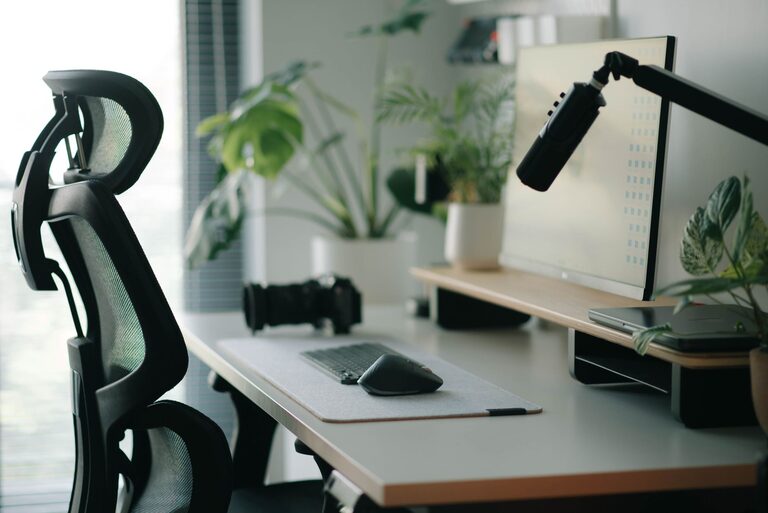
Desk Setup Tips for Focus and Comfort
Creating an effective desk setup is essential for anyone looking to improve focus and comfort during work or study sessions. Whether you’re working from home, in an office, or at school, the way your workspace is arranged can have a significant impact on your productivity and physical well-being. In this post, we’ll explore practical tips to help you build a desk setup that promotes concentration and keeps you comfortable throughout the day.
Why a Good Desk Setup Matters
Your desk is more than just a surface to place your laptop or papers on. It’s your main environment for tasks that require mental effort and physical engagement. A well-designed desk setup can:
– Reduce physical strain and discomfort
– Minimize distractions and improve concentration
– Enhance organization, helping you stay on track
– Create a positive workspace that motivates you
With these benefits in mind, let’s dive into specific tips to optimize your desk for focus and comfort.
Choose the Right Desk and Chair
Desk Height and Surface Space
The height of your desk plays a crucial role in maintaining good posture. Ideally, your desk should allow your arms to rest comfortably at a 90-degree angle when typing or writing. Standard desk height ranges from 28 to 30 inches, but adjustable desks or standing desks offer flexibility to match your body’s needs.
Also, ensure your desk has enough surface area for essential items like your computer, notebooks, and personal items. A cluttered workspace can cause distractions, so balance space usage carefully.
Ergonomic Chair
Investing in a supportive chair is equally important. Look for a chair with adjustable height, lumbar support, and comfortable cushioning. A chair that supports the natural curve of your spine helps prevent back pain and encourages better posture during long work hours.
Position Your Monitor Correctly
Your monitor’s placement affects both your comfort and eye health. Follow these guidelines for optimal monitor setup:
– Position the monitor screen about an arm’s length away (roughly 20-30 inches).
– The top of the screen should be at or slightly below eye level to keep your neck relaxed.
– Tilt the monitor slightly backward (10-20 degrees) for reduced glare.
– Use a monitor stand or adjustable arm if necessary to achieve the right height.
If you use multiple screens, arrange them so the primary display is directly in front of you, and secondary screens are angled towards you to reduce neck strain.
Manage Lighting for Reduced Eye Strain
Good lighting enhances focus and reduces fatigue. Here’s how to improve lighting around your desk:
– Use natural light when possible, but position your desk perpendicular to windows to avoid glare.
– Supplement with adjustable desk lamps that provide focused, soft light.
– Avoid harsh overhead lighting or direct light on screens.
– Consider using warm white bulbs for a calming atmosphere, rather than harsh cool white.
Proper lighting reduces eye strain and helps maintain alertness throughout the day.
Organize Your Desk for Efficiency
Keeping your desk organized can significantly improve your ability to focus. Here are some organizational tips:
– Use trays, drawers, or containers to keep supplies like pens, paper clips, and sticky notes orderly.
– Limit the number of items on your desk’s surface to essentials only.
– Keep cables tidy with clips or sleeves to avoid tangling and clutter.
– Consider using a desk organizer or dedicated space for frequently used items.
A clean and organized desk helps clear your mind and reduces distractions.
Incorporate Comfort Accessories
Adding certain accessories can improve your comfort and reduce strain:
– Keyboard and Mouse: Use an external keyboard and mouse positioned so that your wrists remain straight and relaxed. Look for ergonomic designs if you spend many hours typing.
– Wrist Rests: These can provide extra support and reduce pressure on your wrists.
– Footrest: If your feet don’t comfortably reach the floor, a footrest helps maintain proper posture.
– Desk Mat: A smooth mat can provide a comfortable surface for your hands and protect your desk.
Choosing accessories that support your body reduces fatigue and discomfort.
Personalize Your Space Mindfully
While personal items like photos, plants, or art can make your desk more inviting, keep personalization balanced so it doesn’t become distracting.
– Add greenery like a small plant to improve air quality and create a calming effect.
– Use inspiring but minimal artwork.
– Avoid cluttering your desk with too many decorative items.
Personal touches can boost your mood while maintaining a functional workspace.
Take Breaks and Move
No matter how perfect your desk setup, it’s important to take regular breaks. Standing, stretching, or walking around every 30-60 minutes helps reduce muscle stiffness and improves circulation. Consider setting a timer or using apps that remind you to move. Incorporating movement supports long-term comfort and focus.
Final Thoughts
Optimizing your desk setup is a worthwhile investment in your productivity and well-being. By choosing the right furniture, positioning your equipment thoughtfully, managing lighting, organizing efficiently, and adding comfort-enhancing accessories, you create a workspace that supports both focus and comfort.
Remember that small adjustments can make a big difference. Experiment with these tips and tailor your desk setup to your unique preferences and needs. A well-designed workspace can lead to more enjoyable and effective workdays.